
快速开始
环境要求
- Node.js
>= 18.18 - Yarn
获取代码
git clone https://gitee.com/ice-gl/tvt-asset-manager-serve
cd tvt-asset-manager-serve
安装依赖
yarn
📂 准备素材目录
项目默认扫描根目录下的 assets:
assets/
├── textures/   # 材质贴图
├── images/     # 普通图片
├── videos/     # 视频资源
├── env/        # HDR、EXR、天空图等环境资源
├── json/       # 材质预设、LUT 或其他配置
└── other/      # 其他资源
将文件放入对应目录即可,无需逐项编写资源配置。
常用命令
🧾 只生成资源清单
yarn config
等价于:
node assetServeWatch.js -p ./assets
执行后会生成:
assets/asset-config.json
🔧 启动本地调试服务
yarn serve
默认地址:
- 素材管理与预览页:http://localhost:4100/
- 资源清单:http://localhost:4100/config
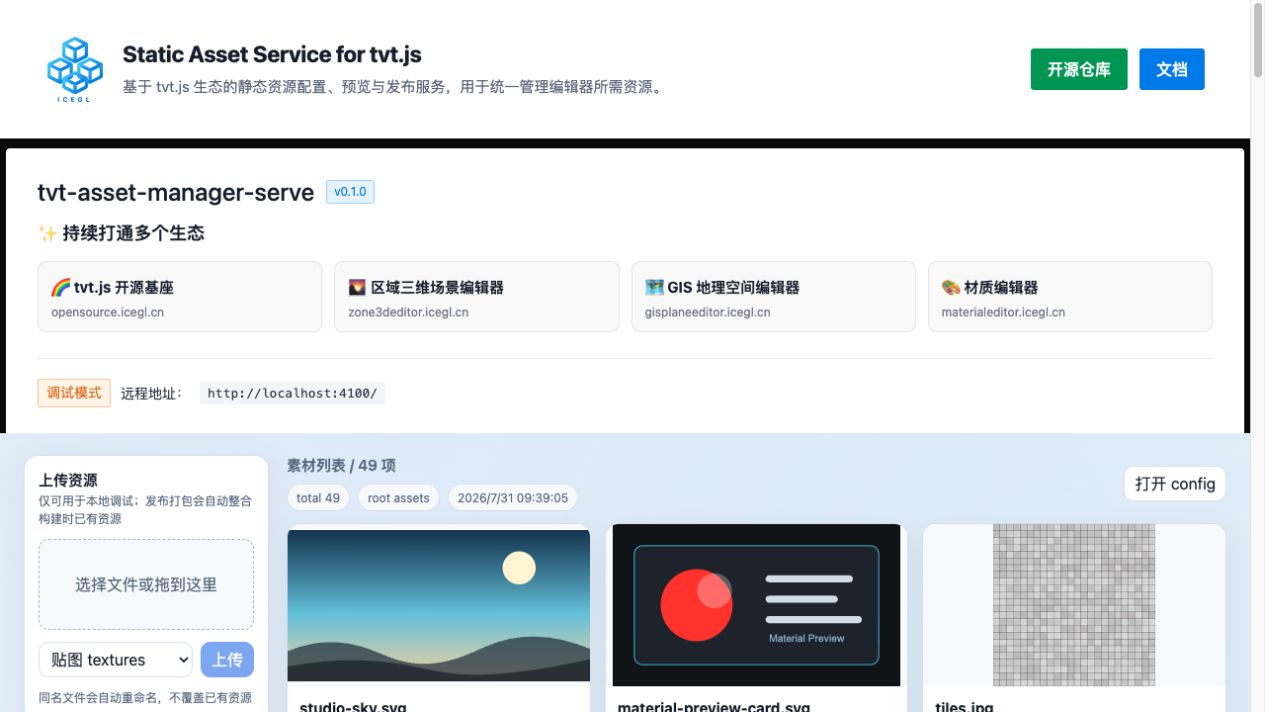
页面顶部显示 调试模式。左侧可以选择分类、批量选择或拖入文件;上传完成后,服务会重新扫描目录并刷新资源列表。
⚠️ 上传接口没有登录、审核和权限系统,只适合在可信的本地网络中调试,请勿直接暴露到公网。
📦 构建静态发布包
yarn build
构建产物写入 dist/:
dist/
├── index.html
├── config
├── config.json
├── asset-config.json
└── assets/
    ├── asset-config.json
    └── ...构建时已有资源
默认构建脚本会将资源 URL 指向:
https://asset-manager.icegl.cn
如需发布到自己的域名:
node assetServeWatch.js --build \
  --path ./assets \
  --dist ./dist \
  --base-url https://your-asset-host.example.com
将 dist/ 部署到静态服务器或 CDN 后,推荐使用:
https://your-asset-host.example.com/config.json
在编辑器中使用
本地联调时,将静态资源服务地址配置为:
http://localhost:4100/config
正式环境使用已部署的资源清单,例如:
https://asset-manager.icegl.cn/config.json
编辑器读取清单后,可通过每条资源的 url 或 previewUrl 加载素材。
上传资源
本地预览页支持选择或拖入多个文件。上传前先选择目标分类:
| 分类值 | 保存目录 |
|---|---|
textures | assets/textures/ |
images | assets/images/ |
videos | assets/videos/ |
env | assets/env/ |
json | assets/json/ |
other | assets/other/ |
默认规则:
- 每次最多上传 20 个文件
- 单文件默认最大 512 MB
- 同名文件会自动添加
-1、-2等后缀,不覆盖原文件 - 隐藏文件与
asset-config.json不允许上传 - 服务不提供在线删除功能
也可以调用上传接口:
curl -F "files=@./demo.png" \
  -F "files=@./demo.mp4" \
  "http://localhost:4100/upload?category=textures"
调整单文件上限:
node assetServeWatch.js --serve \
  --path ./assets \
  --port 4100 \
  --max-upload-size 1024
以上示例将上限调整为 1024 MB。
发布注意事项
- 静态发布版本不包含上传接口,新增资源后需要重新执行构建。
--base-url必须与最终访问资源的公网地址一致。- 部署服务器需要允许编辑器跨域读取 config 与 assets。
- 不要手动修改生成清单;应调整素材目录后重新扫描或构建。